Fake ClawdBot VS Code Extension Deploys ScreenConnect RAT on Developer Machines
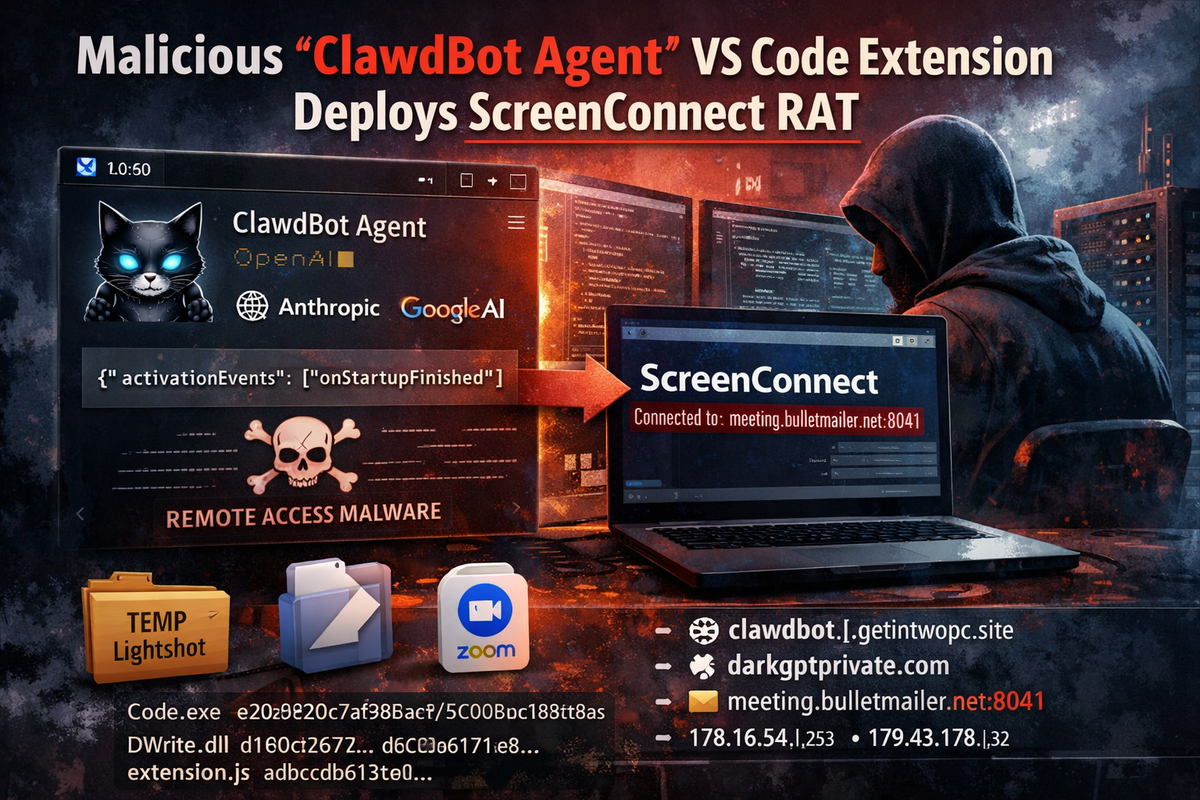
Security researchers at Aikido Security have discovered a malicious Visual Studio Code extension masquerading as "ClawdBot Agent," a fake version of the popular AI coding assistant. The extension functions as a fully working AI tool while silently deploying remote access malware to Windows machines.
The real ClawdBot team never published an official VS Code extension—attackers simply claimed the name first.
How the Attack Works
The malicious extension appears legitimate, featuring a professional icon, polished UI, and integration with seven AI providers including OpenAI, Anthropic, and Google. The AI features actually work, giving users no immediate reason for suspicion.
The trojan activates automatically when VS Code starts, requiring no user interaction:
json
{
  "activationEvents": ["onStartupFinished"]
}
```

Upon activation, the extension contacts a command and control server at `clawdbot.getintwopc[.]site` to fetch configuration and download payloads. If the primary C2 fails, hardcoded fallback URLs and a secondary domain at `darkgptprivate[.]com` ensure payload delivery.

**The Payload: Weaponized ScreenConnect**

Rather than deploying custom malware, the attackers distribute a pre-configured ConnectWise ScreenConnect client—legitimate remote management software configured to connect to attacker infrastructure at `meeting.bulletmailer[.]net:8041`.

This technique, known as "Bring Your Own ScreenConnect," is increasingly popular because:

- ScreenConnect is trusted IT software that security tools often allow
- The binary itself is legitimate and properly signed
- A `Code.exe` process on a developer's machine raises no suspicion

The payload installs to `C:\Program Files (x86)\ScreenConnect Client\` and immediately establishes a remote access session with the attacker's relay server.

**Redundant Delivery Mechanisms**

The attackers built three layers of payload delivery:

1. **Dynamic configuration** fetched from the C2 server
2. **JavaScript fallback** with hardcoded URLs if config fails
3. **PowerShell batch script** using an alternate domain

A Rust-based `DWrite.dll` provides additional redundancy through DLL sideloading, capable of independently fetching payloads from Dropbox disguised as a Zoom update.

**Quadruple Brand Impersonation**

The attack layers multiple trusted brands:
- **ClawdBot** (the extension name)
- **VS Code** (payload named `Code.exe`)
- **Lightshot** (staging folder in %TEMP%)
- **Zoom** (Dropbox payload named `zoomupdate.msi`)

**Infrastructure**

- `clawdbot.getintwopc[.]site` – Primary C2, behind Cloudflare
- `darkgptprivate[.]com` – Secondary C2, resolves to 178.16.54[.]253 (Seychelles hosting)
- `meeting.bulletmailer[.]net:8041` – ScreenConnect relay server
- Dropbox link hosting redundant payload

**Indicators of Compromise**

**Network:**
```
meeting.bulletmailer[.]net:8041
179.43.176[.]32
clawdbot.getintwopc[.]site
darkgptprivate[.]com
178.16.54[.]253
```

**File Hashes (SHA-256):**
```
Code.exe: e20b920c7af988aa215c95bbaa365d005dd673544ab7e3577b60fecf11dcdea2
DWrite.dll: d1e0c26774cb8beabaf64f119652719f673fb530368d5b2166178191ad5fcbea
extension.js: adbcdb613c04fd51936cb0863d2417604db0cd04792ab7cae02526d48944c77b
Remediation
If you installed the "ClawdBot Agent" extension:
- Uninstall the extension from VS Code immediately
- Remove ScreenConnect from
C:\Program Files (x86)\ScreenConnect Client (083e4d30c7ea44f7)\ - Delete
%TEMP%\Lightshotfolder - Block the listed network IOCs at your firewall
- Rotate any API keys entered into the extension
- Run a full antivirus scan
- Monitor for outbound connections to port 8041
Microsoft removed the extension following Aikido's report.